I work with people in New Zealand, Croatia, the UK, and across ET, CT, and PT. Before I message any of them, I need to know what time it is there and, more importantly, what day it is. Windows gives you two extra clocks, tucked away in a taskbar flyout. That wasn’t going to cut it.
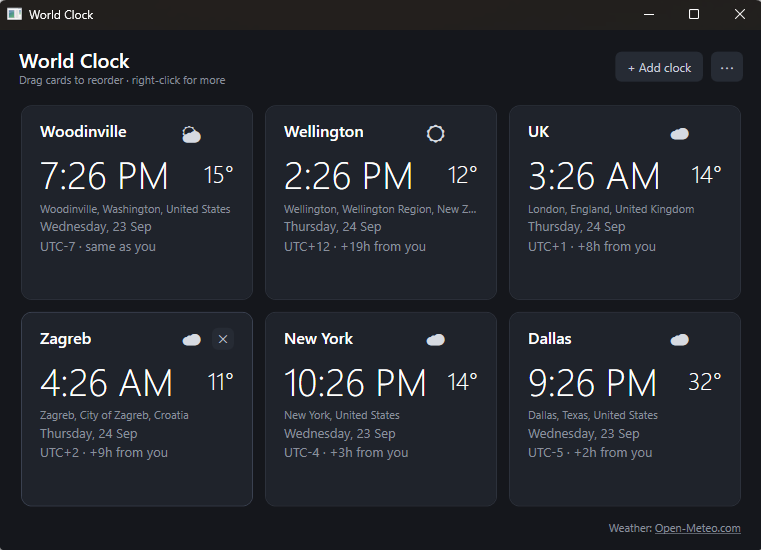
So I built World Clock, a small native Windows app that shows every place I care about on its own card, with the time, date, offset, and weather. I built it by pair-programming with Claude Code, Anthropic’s AI coding agent. The first working version took about three minutes. Three versions later, total hands-on time was about two and a half hours across two days, all on my regular Claude plan.
The three minutes gets the attention. The two and a half hours is the interesting part.
The Problem: Two Wrong Stories About AI Coding
There are two popular stories about building software with AI, and both are wrong.
The hype story: type a prompt, get an app. Software is solved.
The skeptic story: fine for toy demos, but it falls apart the moment you need real software with real edge cases.
The reality is that my version 1 really was a three-minute job: six clocks, add, remove, drag to reorder, always on top, settings saved locally. But it wasn’t the app I wanted to use every day. Getting there took another two and a half hours, and almost none of that time went into code. It went into deciding what the app should do, what it shouldn’t, and what happens when things go wrong.
The hype story ignores that work. The skeptic story assumes the AI can’t do it. Actually, the AI did most of the building and I did most of the deciding, and that split is the whole point.
The Solution: The Workflow I Actually Used
The loop was simple and repeated dozens of times:
- Describe the change in plain language. “Add the current temperature to each card, in °C or °F.”
- Claude Code writes and builds it.
- Run it against my real settings and check it.
- Adjust. Usually a sentence or two.
For bigger features, I added three steps:
- Write a spec first. Claude Code drafted a feature definition with goals, non-goals, and requirements. Every open question was put to me as an explicit decision and recorded in the spec before any code was written.
- Verify properly. Every build had to pass with zero warnings, and Claude Code drove the running app through Windows UI Automation to capture screenshots and click through menus.
- Test where failure is silent. The settings sync, where a bug could quietly lose someone’s data, got automated tests covering every first-sign-in and conflict path. The rest of the app didn’t need that yet.
Step 5 is where the value was. The spec turned every “what should happen here?” into a decision with a name, a reason, and a trade-off.
Evidence: What the Decisions Looked Like
Here’s how the app moved in two days:
| Version | Date | What changed |
|---|---|---|
| 1.0 | Sept. 22 | Six clocks, add/remove/reorder, always on top, saved locally |
| 1.1 | Sept. 23 | Weather on each card, add a clock by city search, light and dark themes |
| 1.2 | Sept. 23 | Header simplified, theme follows Windows, one-command version bumps |
Three decisions show what the agent couldn’t do for me.
Decision 1: Choose the weather service with no API key
The repo is public. Any service that needs an API key means a secret to leak, hide, or make every fork register for. I chose Open-Meteo, which is free and needs no key.
The math made it easy: one request fetches weather for every clock at once, refreshed every 15 minutes.
6 clocks × 4 refreshes an hour × 24 hours = 96 calls a day, against a free limit of 10,000. That’s under 1% of the allowance.
The trade-off: Open-Meteo’s free tier is non-commercial only. For a free app with no ads, that’s fine. For anything commercial, it’s a different decision, and the weather code sits behind an interface so the provider can be swapped.
Decision 2: Wrong must be visible, never silent
To show weather, a clock needs coordinates, but a time zone isn’t a location. “Central Standard Time” covers Dallas to Winnipeg.
The obvious shortcut was to look up each clock’s label. When we tested it, “UK” came back as a village in Russia’s Irkutsk region, and “New Zealand” landed in the middle of the country. Either would have shown the wrong weather with no hint that anything was off.
So I set a principle: a wrong location must always be visible on the card. Adding a clock became a city search, and the card shows the matched place (“Dallas, Texas, United States”). For existing clocks, the upgrade looks up the label but keeps a result only if its time zone matches the clock’s. “UK” fails that check, and the card shows Set location… instead of Siberian weather.
The same principle covers failures. If the weather service can’t be reached, the temperature grays out after 20 minutes and disappears after 2 hours. It never shows a stale number as if it were current.
Decision 3: Cut the header to one main action
By version 1.1, the header had five controls of equal weight in four different styles. A quick UX review sorted them by how often they’re used. Only Add clock is used regularly. Units, theme, and always-on-top get set once. So version 1.2 has one button and a ⋯ menu, the standard Windows 11 pattern. Changing units now takes one more click, and that’s a trade I’m happy with.
Who did what
| Claude Code handled | I decided |
|---|---|
| Writing and building every change | What the app is for, and what it isn’t |
| Drafting specs and surfacing open questions | The answers to those questions |
| Weather, geocoding, and OneDrive integration code | Which services, and what trade-offs to accept |
| Driving the UI to verify changes | Whether a change was actually right |
| Writing the sync tests | Where tests mattered and where they didn’t |
What This Means for Leaders
The ratio is the story. Version 1 took 3 minutes of about 150. That’s 2% of my time spent getting working code, and 98% spent deciding what the app should be. When code is this cheap, product judgment becomes the bottleneck.
Specs become decision logs. The best artifact from this project isn’t the code, it’s the record of what was decided and why. That’s what makes it possible to revisit a choice later without re-litigating it.
Test where failure is silent. Not everything needs tests on day one. Anything that could quietly lose data does.
Look at who’s building. I’m a CPO, not a working developer, and I shipped a real native app with sync, weather, and a public repo in an afternoon’s worth of effort. That changes who on your team can prototype, validate, and ship.
Key Takeaways
- The first version is nearly free. Budget your time for everything after it.
- Write the spec before the code and force open questions into explicit, recorded decisions.
- Make wrong states visible. Silent failures are the ones AI-built software gets away with.
- Put automated tests where a bug could lose data, and keep moving everywhere else.
- Judgment is now the scarce skill. Hire and develop for it.
The code took three minutes. The decisions are what made it worth using.